

Android Uygulama 5- ToDoList Uygulaması – Firebase
Merhaba Arkadaşlar,
Bugün ki dersimiz bir firebase’i kullanarak todoList yani not tutma uygulaması yapacağız.
Android’te api 15 sürümü ile birlikte bir android projesi açalım.
Not 1 : burada ki package ismini unutmayın.
Projenin Tanıtımı: Firebase ‘teki auth ve database özelliği kullanılarak login ve sign up işlemi yapılarak kullanıcıya özgü not tutma kısmı olan bir proje olacaktır. Resimler ve proje kaynak dosyaları aşağıdadır.
Öncelikle bu proje için ilk olarak firebase kısmına giriş yapmanız gerekmekte. //console.firebase.google.com/ ile eğer kayıt değilseniz kayıt olunuz. Kayıtlı iseniz proje ekle ile ilk projenizi ekleyiniz.
Proje Oluştur’u seçerek ilk proje isminizi giriniz.

Evet, artık bizi bir uygulama kısmı karşıladı. Hangi uygulama ile uğraşılacaksa onu seçiyoruz. Tabiki şuan için android seçiyoruz.

İlk olarak oluşturduğumuz projedeki package ismini buraya ekliyoruz.

Sonra bize bir json dosyası veriyor.Bu dosyayı indirin.Sonrasında Json dosyasını app klasörü içine kopyalayın.

Ek olarak gradle dosyası kaldı elimizde. Şimdi 2 tane gradle dosyanızın değiştirmeniz gereken yerlerini aşağıya ekliyorum.
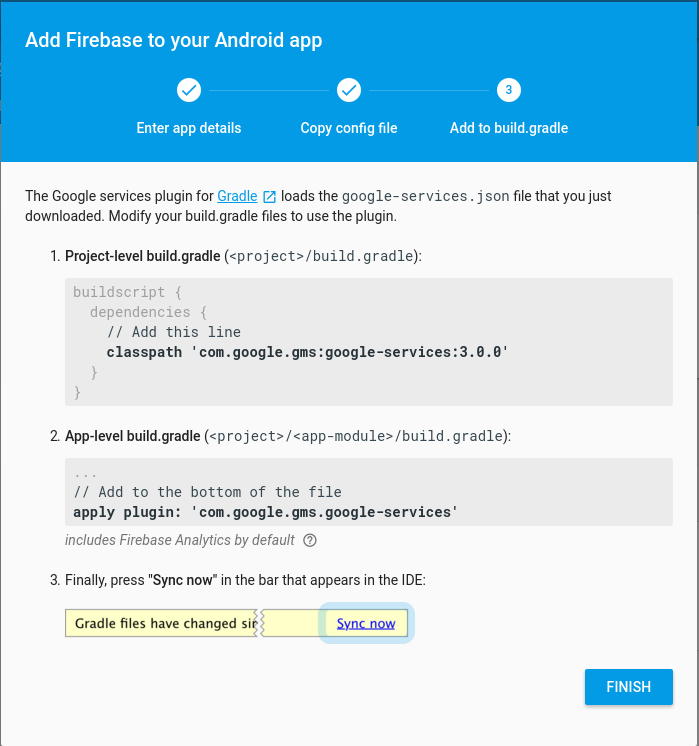

build.gradle –> Project kısmı
1 2 3 4 5 6 7 8 9 10 11 12 13 14 15 16 17 18 19 | buildscript { repositories { jcenter() } dependencies { classpath 'com.android.tools.build:gradle:2.3.2' classpath 'com.google.gms:google-services:3.1.0' } } allprojects { repositories { jcenter() } } task clean(type: Delete) { delete rootProject.buildDir } |
build.gradle –> app kısmı
1 2 3 4 5 6 7 8 9 10 11 12 13 14 15 16 17 18 19 20 21 22 23 24 25 26 27 28 29 30 31 32 33 34 | apply plugin: 'com.android.application' android { compileSdkVersion 25 buildToolsVersion "25.0.3" defaultConfig { applicationId "com.umiitkose.firebase_todolist" minSdkVersion 15 targetSdkVersion 25 versionCode 1 versionName "1.0" testInstrumentationRunner "android.support.test.runner.AndroidJUnitRunner" } buildTypes { release { minifyEnabled false proguardFiles getDefaultProguardFile('proguard-android.txt'), 'proguard-rules.pro' } } } dependencies { compile fileTree(dir: 'libs', include: ['*.jar']) androidTestCompile('com.android.support.test.espresso:espresso-core:2.2.2', { exclude group: 'com.android.support', module: 'support-annotations' }) compile 'com.android.support:appcompat-v7:25.3.1' compile 'com.android.support.constraint:constraint-layout:1.0.2' compile 'com.android.support:design:24.2.0' compile 'com.google.firebase:firebase-database:9.4.0' compile 'com.google.firebase:firebase-auth:9.4.0' testCompile 'junit:junit:4.12' } apply plugin: 'com.google.gms.google-services' |
Şimdi ek olarak firebase’te auth özelliğini açacağız. Geliştirme kısmında “Authentication” sekmesini açıyoruz.
Oturum açma yönteminde eposta kısmını aktif hale getiriyoruz.

Firebase ile ilgili son yapacağımız işlem ise kurallarımızı aktif hale getirmek. Geliştirme Kısmında ki Database sekmesinden rules-kurallar kısmına giriş yapınız. Aşağıdaki kodu kurallara ekleyiniz.
Not 2: Firebase ile ilgili rules, auth, database okuma, yazma gibi işlemler ek bir ders halinde anlatılacaktır.
Kural olarakta auth boş olamaz ve auth.uid ‘miz yazma ve okuma da uid’ye eşit olacaktır. title kısmı ise string ve uzunluğu 0’dan büyük olmalıdır yani boş olamaz.
1 2 3 4 5 6 7 8 9 10 11 12 13 14 15 16 17 | { "rules": { "users": { "$uid": { ".read": "auth != null && auth.uid == $uid", ".write": "auth != null && auth.uid == $uid", "items": { "$item_id": { "title": { ".validate": "newData.isString() && newData.val().length > 0" } } } } } } } |
Şimdi tek tek tasarımdan itibaren kodları ekleyeceğiz.
Android Manifest :
1 2 3 4 5 6 7 8 9 10 11 12 13 14 15 16 17 18 19 20 21 22 23 24 25 26 | <?xml version="1.0" encoding="utf-8"?> <manifest package="com.umiitkose.firebase_todolist" xmlns:android="//schemas.android.com/apk/res/android"> <application android:allowBackup="true" android:icon="@mipmap/ic_launcher" android:label="@string/app_name" android:supportsRtl="true" android:theme="@style/AppTheme"> <activity android:name=".MainActivity" android:label="@string/app_name" android:theme="@style/AppTheme.NoActionBar"> <intent-filter> <action android:name="android.intent.action.MAIN"/> <category android:name="android.intent.category.LAUNCHER"/> </intent-filter> </activity> <activity android:name="com.umiitkose.firebase_todolist.LogInActivity"> </activity> <activity android:name="com.umiitkose.firebase_todolist.SignUpActivity"> </activity> </application> </manifest> |
Item.java
1 2 3 4 5 6 7 8 9 10 11 12 13 14 15 16 17 18 19 20 | package com.umiitkose.firebase_todolist; public class Item { private String title; public Item() {} public Item(String title) { this.title = title; } public String getTitle() { return title; } public void setTitle(String title) { this.title = title; } } |
logInActivity.java
1 2 3 4 5 6 7 8 9 10 11 12 13 14 15 16 17 18 19 20 21 22 23 24 25 26 27 28 29 30 31 32 33 34 35 36 37 38 39 40 41 42 43 44 45 46 47 48 49 50 51 52 53 54 55 56 57 58 59 60 61 62 63 64 65 66 67 68 69 70 71 72 73 74 75 76 77 78 79 80 81 82 83 84 85 86 | package com.umiitkose.firebase_todolist; import android.content.Intent; import android.os.Bundle; import android.support.annotation.NonNull; import android.support.v7.app.AlertDialog; import android.support.v7.app.AppCompatActivity; import android.view.View; import android.widget.Button; import android.widget.EditText; import android.widget.TextView; import com.google.android.gms.tasks.OnCompleteListener; import com.google.android.gms.tasks.Task; import com.google.firebase.auth.AuthResult; import com.google.firebase.auth.FirebaseAuth; public class LogInActivity extends AppCompatActivity { protected EditText emailEditText; protected EditText passwordEditText; protected Button logInButton; protected TextView signUpTextView; private FirebaseAuth mFirebaseAuth; @Override protected void onCreate(Bundle savedInstanceState) { super.onCreate(savedInstanceState); setContentView(R.layout.activity_log_in); mFirebaseAuth = FirebaseAuth.getInstance(); signUpTextView = (TextView) findViewById(R.id.signUpText); emailEditText = (EditText) findViewById(R.id.emailField); passwordEditText = (EditText) findViewById(R.id.passwordField); logInButton = (Button) findViewById(R.id.loginButton); signUpTextView.setOnClickListener(new View.OnClickListener() { @Override public void onClick(View v) { Intent intent = new Intent(LogInActivity.this, SignUpActivity.class); startActivity(intent); } }); logInButton.setOnClickListener(new View.OnClickListener() { @Override public void onClick(View v) { String email = emailEditText.getText().toString(); String password = passwordEditText.getText().toString(); email = email.trim(); password = password.trim(); if (email.isEmpty() || password.isEmpty()) { AlertDialog.Builder builder = new AlertDialog.Builder(LogInActivity.this); builder.setMessage(R.string.login_error_message) .setTitle(R.string.login_error_title) .setPositiveButton(android.R.string.ok, null); AlertDialog dialog = builder.create(); dialog.show(); } else { mFirebaseAuth.signInWithEmailAndPassword(email, password) .addOnCompleteListener(LogInActivity.this, new OnCompleteListener<AuthResult>() { @Override public void onComplete(@NonNull Task<AuthResult> task) { if (task.isSuccessful()) { Intent intent = new Intent(LogInActivity.this, MainActivity.class); intent.addFlags(Intent.FLAG_ACTIVITY_NEW_TASK); intent.addFlags(Intent.FLAG_ACTIVITY_CLEAR_TASK); startActivity(intent); } else { AlertDialog.Builder builder = new AlertDialog.Builder(LogInActivity.this); builder.setMessage(task.getException().getMessage()) .setTitle(R.string.login_error_title) .setPositiveButton(android.R.string.ok, null); AlertDialog dialog = builder.create(); dialog.show(); } } }); } } }); } } |
MainActivity.java
1 2 3 4 5 6 7 8 9 10 11 12 13 14 15 16 17 18 19 20 21 22 23 24 25 26 27 28 29 30 31 32 33 34 35 36 37 38 39 40 41 42 43 44 45 46 47 48 49 50 51 52 53 54 55 56 57 58 59 60 61 62 63 64 65 66 67 68 69 70 71 72 73 74 75 76 77 78 79 80 81 82 83 84 85 86 87 88 89 90 91 92 93 94 95 96 97 98 99 100 101 102 103 104 105 106 107 108 109 110 111 112 113 114 115 116 117 118 119 120 121 122 123 124 125 126 127 128 129 130 131 132 133 134 135 136 137 138 139 140 141 142 143 | package com.umiitkose.firebase_todolist; import android.content.Intent; import android.os.Bundle; import android.support.v7.app.AppCompatActivity; import android.support.v7.widget.Toolbar; import android.view.Menu; import android.view.MenuItem; import android.view.View; import android.widget.AdapterView; import android.widget.ArrayAdapter; import android.widget.Button; import android.widget.EditText; import android.widget.ListView; import com.google.firebase.auth.FirebaseAuth; import com.google.firebase.auth.FirebaseUser; import com.google.firebase.database.ChildEventListener; import com.google.firebase.database.DataSnapshot; import com.google.firebase.database.DatabaseError; import com.google.firebase.database.DatabaseReference; import com.google.firebase.database.FirebaseDatabase; import com.google.firebase.database.ValueEventListener; import com.umiitkose.firebase_todolist.Item; import com.umiitkose.firebase_todolist.LogInActivity; public class MainActivity extends AppCompatActivity { private FirebaseAuth mFirebaseAuth; private FirebaseUser mFirebaseUser; private DatabaseReference mDatabase; private String mUserId; @Override protected void onCreate(Bundle savedInstanceState) { super.onCreate(savedInstanceState); setContentView(R.layout.activity_main); Toolbar toolbar = (Toolbar) findViewById(R.id.toolbar); setSupportActionBar(toolbar); mFirebaseAuth = FirebaseAuth.getInstance(); mFirebaseUser = mFirebaseAuth.getCurrentUser(); mDatabase = FirebaseDatabase.getInstance().getReference(); if (mFirebaseUser == null) { loadLogInView(); } else { mUserId = mFirebaseUser.getUid(); final ListView listView = (ListView) findViewById(R.id.listView); final ArrayAdapter<String> adapter = new ArrayAdapter<>(this, android.R.layout.simple_list_item_1, android.R.id.text1); listView.setAdapter(adapter); final EditText text = (EditText) findViewById(R.id.todoText); final Button button = (Button) findViewById(R.id.addButton); button.setOnClickListener(new View.OnClickListener() { public void onClick(View v) { Item item = new Item(text.getText().toString()); mDatabase.child("users").child(mUserId).child("items").push().setValue(item); text.setText(""); } }); mDatabase.child("users").child(mUserId).child("items").addChildEventListener(new ChildEventListener() { @Override public void onChildAdded(DataSnapshot dataSnapshot, String s) { adapter.add((String) dataSnapshot.child("title").getValue()); } @Override public void onChildChanged(DataSnapshot dataSnapshot, String s) { } @Override public void onChildRemoved(DataSnapshot dataSnapshot) { adapter.remove((String) dataSnapshot.child("title").getValue()); } @Override public void onChildMoved(DataSnapshot dataSnapshot, String s) { } @Override public void onCancelled(DatabaseError databaseError) { } }); listView.setOnItemClickListener(new AdapterView.OnItemClickListener() { public void onItemClick(AdapterView<?> parent, View view, int position, long id) { mDatabase.child("users").child(mUserId).child("items") .orderByChild("title") .equalTo((String) listView.getItemAtPosition(position)) .addListenerForSingleValueEvent(new ValueEventListener() { @Override public void onDataChange(DataSnapshot dataSnapshot) { if (dataSnapshot.hasChildren()) { DataSnapshot firstChild = dataSnapshot.getChildren().iterator().next(); firstChild.getRef().removeValue(); } } @Override public void onCancelled(DatabaseError databaseError) { } }); } }); } } private void loadLogInView() { Intent intent = new Intent(this, LogInActivity.class); startActivity(intent); } @Override public boolean onCreateOptionsMenu(Menu menu) { // Inflate the menu; this adds items to the action bar if it is present. getMenuInflater().inflate(R.menu.menu_main, menu); return true; } @Override public boolean onOptionsItemSelected(MenuItem item) { // Handle action bar item clicks here. The action bar will // automatically handle clicks on the Home/Up button, so long // as you specify a parent activity in AndroidManifest.xml. int id = item.getItemId(); //noinspection SimplifiableIfStatement if (id == R.id.action_logout) { mFirebaseAuth.signOut(); loadLogInView(); } return super.onOptionsItemSelected(item); } } |
signUpActivity.java
1 2 3 4 5 6 7 8 9 10 11 12 13 14 15 16 17 18 19 20 21 22 23 24 25 26 27 28 29 30 31 32 33 34 35 36 37 38 39 40 41 42 43 44 45 46 47 48 49 50 51 52 53 54 55 56 57 58 59 60 61 62 63 64 65 66 67 68 69 70 71 72 73 74 75 76 | package com.umiitkose.firebase_todolist; import android.content.Intent; import android.os.Bundle; import android.support.annotation.NonNull; import android.support.v7.app.AlertDialog; import android.support.v7.app.AppCompatActivity; import android.view.View; import android.widget.Button; import android.widget.EditText; import com.google.android.gms.tasks.OnCompleteListener; import com.google.android.gms.tasks.Task; import com.google.firebase.auth.AuthResult; import com.google.firebase.auth.FirebaseAuth; public class SignUpActivity extends AppCompatActivity { protected EditText passwordEditText; protected EditText emailEditText; protected Button signUpButton; private FirebaseAuth mFirebaseAuth; @Override protected void onCreate(Bundle savedInstanceState) { super.onCreate(savedInstanceState); setContentView(R.layout.activity_sign_up); mFirebaseAuth = FirebaseAuth.getInstance(); passwordEditText = (EditText)findViewById(R.id.passwordField); emailEditText = (EditText)findViewById(R.id.emailField); signUpButton = (Button)findViewById(R.id.signupButton); signUpButton.setOnClickListener(new View.OnClickListener() { @Override public void onClick(View v) { String password = passwordEditText.getText().toString(); String email = emailEditText.getText().toString(); password = password.trim(); email = email.trim(); if (password.isEmpty() || email.isEmpty()) { AlertDialog.Builder builder = new AlertDialog.Builder(SignUpActivity.this); builder.setMessage(R.string.signup_error_message) .setTitle(R.string.signup_error_title) .setPositiveButton(android.R.string.ok, null); AlertDialog dialog = builder.create(); dialog.show(); } else { mFirebaseAuth.createUserWithEmailAndPassword(email, password) .addOnCompleteListener(SignUpActivity.this, new OnCompleteListener<AuthResult>() { @Override public void onComplete(@NonNull Task<AuthResult> task) { if (task.isSuccessful()) { Intent intent = new Intent(SignUpActivity.this, MainActivity.class); intent.addFlags(Intent.FLAG_ACTIVITY_NEW_TASK); intent.addFlags(Intent.FLAG_ACTIVITY_CLEAR_TASK); startActivity(intent); } else { AlertDialog.Builder builder = new AlertDialog.Builder(SignUpActivity.this); builder.setMessage(task.getException().getMessage()) .setTitle(R.string.login_error_title) .setPositiveButton(android.R.string.ok, null); AlertDialog dialog = builder.create(); dialog.show(); } } }); } } }); } } |
activity_log_in.xml
1 2 3 4 5 6 7 8 9 10 11 12 13 14 15 16 17 18 19 20 21 22 23 24 25 26 27 28 29 30 31 32 33 34 35 36 37 38 39 40 41 42 43 44 45 46 47 48 49 50 51 52 | <?xml version="1.0" encoding="utf-8"?> <RelativeLayout xmlns:android="//schemas.android.com/apk/res/android" xmlns:tools="//schemas.android.com/tools" android:layout_width="match_parent" android:layout_height="match_parent" android:paddingBottom="@dimen/activity_vertical_margin" android:paddingLeft="@dimen/activity_horizontal_margin" android:paddingRight="@dimen/activity_horizontal_margin" android:paddingTop="@dimen/activity_vertical_margin" tools:context="com.umiitkose.firebase_todolist.LogInActivity" > <EditText android:id="@+id/emailField" android:layout_width="match_parent" android:layout_height="wrap_content" android:layout_alignParentLeft="true" android:layout_alignParentTop="true" android:ems="10" android:inputType="textEmailAddress" android:hint="@string/email_hint" > <requestFocus /> </EditText> <EditText android:id="@+id/passwordField" android:layout_width="match_parent" android:layout_height="wrap_content" android:layout_alignLeft="@+id/emailField" android:layout_below="@+id/emailField" android:ems="10" android:hint="@string/password_hint" android:inputType="textPassword" /> <Button android:id="@+id/loginButton" android:layout_width="match_parent" android:layout_height="wrap_content" android:layout_alignLeft="@+id/passwordField" android:layout_below="@+id/passwordField" android:text="@string/login_button_label" /> <TextView android:id="@+id/signUpText" android:layout_width="wrap_content" android:layout_height="wrap_content" android:layout_below="@+id/loginButton" android:layout_centerHorizontal="true" android:layout_marginTop="69dp" android:text="@string/sign_up_text" /> </RelativeLayout> |
activity_main.xml
1 2 3 4 5 6 7 8 9 10 11 12 13 14 15 16 17 18 19 20 21 22 23 24 25 26 27 | <?xml version="1.0" encoding="utf-8"?> <android.support.design.widget.CoordinatorLayout xmlns:android="//schemas.android.com/apk/res/android" xmlns:app="//schemas.android.com/apk/res-auto" xmlns:tools="//schemas.android.com/tools" android:layout_width="match_parent" android:layout_height="match_parent" android:fitsSystemWindows="true" tools:context=".MainActivity"> <android.support.design.widget.AppBarLayout android:layout_width="match_parent" android:layout_height="wrap_content" android:theme="@style/AppTheme.AppBarOverlay"> <android.support.v7.widget.Toolbar android:id="@+id/toolbar" android:layout_width="match_parent" android:layout_height="?attr/actionBarSize" android:background="?attr/colorPrimary" app:popupTheme="@style/AppTheme.PopupOverlay"/> </android.support.design.widget.AppBarLayout> <include layout="@layout/content_main"/> </android.support.design.widget.CoordinatorLayout> |
content_main.xml
1 2 3 4 5 6 7 8 9 10 11 12 13 14 15 16 17 18 19 20 21 22 23 24 25 26 27 28 29 30 31 32 33 34 35 36 37 38 39 | <?xml version="1.0" encoding="utf-8"?> <LinearLayout xmlns:android="//schemas.android.com/apk/res/android" xmlns:tools="//schemas.android.com/tools" xmlns:app="//schemas.android.com/apk/res-auto" android:layout_width="match_parent" android:layout_height="match_parent" android:paddingLeft="@dimen/activity_horizontal_margin" android:paddingRight="@dimen/activity_horizontal_margin" android:paddingTop="@dimen/activity_vertical_margin" android:paddingBottom="@dimen/activity_vertical_margin" app:layout_behavior="@string/appbar_scrolling_view_behavior" tools:context=".MainActivity" tools:showIn="@layout/activity_main" android:orientation="vertical"> <ListView android:id="@+id/listView" android:layout_width="match_parent" android:layout_height="0dp" android:layout_weight="1"> </ListView> <LinearLayout android:layout_width="match_parent" android:layout_height="wrap_content" android:orientation="vertical" android:layout_gravity="bottom"> <EditText android:id="@+id/todoText" android:layout_width="match_parent" android:layout_height="wrap_content"/> <Button android:id="@+id/addButton" android:layout_width="match_parent" android:layout_height="wrap_content" android:text="@string/add_item"/> </LinearLayout> </LinearLayout> |
activity_sign_up.xml
1 2 3 4 5 6 7 8 9 10 11 12 13 14 15 16 17 18 19 20 21 22 23 24 25 26 27 28 29 30 31 32 33 34 35 36 37 38 39 40 41 42 43 | <?xml version="1.0" encoding="utf-8"?> <RelativeLayout xmlns:android="//schemas.android.com/apk/res/android" xmlns:tools="//schemas.android.com/tools" android:layout_width="match_parent" android:layout_height="match_parent" android:paddingBottom="@dimen/activity_vertical_margin" android:paddingLeft="@dimen/activity_horizontal_margin" android:paddingRight="@dimen/activity_horizontal_margin" android:paddingTop="@dimen/activity_vertical_margin" tools:context="com.umiitkose.firebase_todolist.SignUpActivity" > <EditText android:id="@+id/emailField" android:layout_width="match_parent" android:layout_height="wrap_content" android:layout_alignParentLeft="true" android:layout_alignParentTop="true" android:ems="10" android:inputType="textEmailAddress" android:hint="@string/email_hint" > <requestFocus /> </EditText> <EditText android:id="@+id/passwordField" android:layout_width="match_parent" android:layout_height="wrap_content" android:layout_alignLeft="@+id/emailField" android:layout_below="@+id/emailField" android:ems="10" android:inputType="textPassword" android:hint="@string/password_hint" /> <Button android:id="@+id/signupButton" android:layout_width="match_parent" android:layout_height="wrap_content" android:layout_alignLeft="@+id/passwordField" android:layout_below="@+id/passwordField" android:text="@string/sign_up_button_label" /> </RelativeLayout> |
strings.xml
1 2 3 4 5 6 7 8 9 10 11 12 13 14 15 16 17 18 | <resources> <string name="app_name">To Do</string> <string name="action_settings">Ayarlar</string> <string name="password_hint">Lütfen Şifrenizi Giriniz.</string> <string name="email_hint">Lütfen Emailiniz giriniz.</string> <string name="sign_up_button_label">Sign Up</string> <string name="signup_error_message">Lütfen Email ve Şifrenizi giriniz</string> <string name="signup_error_title">Error!</string> <string name="signup_success">Hesap başarıyla oluşturuldu. Giriş yapabilirsiniz.</string> <string name="login_error_message">Lütfen email ve şifrenizi giriniz!</string> <string name="login_error_title">Hata!</string> <string name="login_button_label">Giriş</string> <string name="sign_up_text">Kaydol</string> <string name="title_activity_login">Giriş Yap</string> <string name="add_item">Yeni not ekleyin.</string> <string name="action_logout">Çıkış Yap</string> </resources> |
menu –> menu_main.xml
1 2 3 4 5 6 7 8 9 10 | <menu xmlns:android="//schemas.android.com/apk/res/android" xmlns:app="//schemas.android.com/apk/res-auto" xmlns:tools="//schemas.android.com/tools" tools:context=".MainActivity"> <item android:id="@+id/action_logout" android:orderInCategory="100" android:title="@string/action_logout" app:showAsAction="never"/> </menu> |
VeriTabanı Ekran görüntüleri:


Proje Ekran Görüntüleri:


Proje Kaynak Dosyası :




Yaptığınız uygulamanın tüm kısımlarını yüklememeniz çok kötü gerçekten. Daha fazla fotoğraf ve bilgi paylaşmanız iyi olabilirdi çünkü uygulamanız ile alakalı hiçbir şey tam anlamıyla anlaşılmıyor. İyi çalışmalar.
Yaptığınız uygulamanın tüm kısımlarını yüklememeniz çok kötü gerçekten. Daha fazla fotoğraf ve bilgi paylaşmanız iyi olabilirdi çünkü uygulamanız ile alakalı hiçbir şey tam anlamıyla anlaşılmıyor. İyi çalışmalar.
Merhabalar,
Takıldığınız kısımları paylaşabailir misiniz ? (eposta için : [email protected] )
Peki güncelleme işlemi nasıl yapılacak
Lütfen cevap ver
Merhaba Hocam, Elinde unique id ve title ‘ın vardır. Bu elemanlardan title listeletmen lazım. Kullanıcı hangi title ‘ı güncelleyecekse seçtirip o title değerini ekranda gösterip title ‘ı güncellediğinde firebase ‘te ilgili title ‘ı güncellemen yeterli olacaktır.
İşte o güncelleme işi için nasıl bir kod yazmam gerekir